Introduction
Volunteer sign-up forms now display configured volunteer post details directly on the form, including the post date, time, and remaining available slots. This helps volunteers review key shift information before registering and helps organizations reduce the risk of overbooking.
Volunteer Sign-Up Form Shift Details
When a volunteer post is configured with a date, time, and available slots, the volunteer sign-up form will automatically display those details to the volunteer.
Displayed information includes:
- Post date
- Post time
- Remaining available slots
Once all available slots have been filled, the volunteer opportunity is automatically hidden from the form.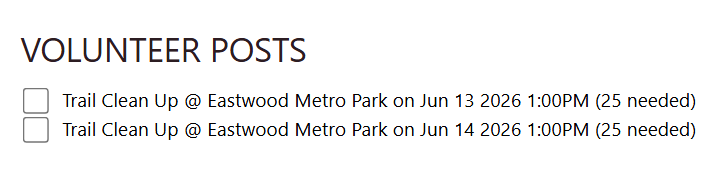
Outcome
Users can provide volunteers with clearer shift information during registration while helping prevent volunteers from signing up for opportunities that are already full.
FAQ & Further Reading
Q. What happens when all available volunteer slots are filled?
A. The opportunity is automatically hidden from the sign-up form.
Q. Do users need to manually add the shift details to the form?
A. No. The configured post date, time, and remaining available slots display automatically.
Articles
- Events, Auctions & Volunteers
- Campaign - Surveys: How to Create a Poll & Survey Form and How to View the Results
- Communication: How to Send Messages from Listing Screens
- Volunteers App: How to Set up and Leverage Volunteers App in CharityEngine
- Auctions App: Creating, Managing, and Closing an Online Auction
- Events: A Comprehensive Walk Through for Events Set-Up
- Event Ticket Soft Credits
- Calendar Enhancements and Volunteer Integration
- Event Detail - Funds Raised Reporting
- Event Duplication Process
- Online Event Guest Management
- Events - Early Bird Tickets
- Events - Quick Start Guide
