Campaigns & Forms: AI-Powered Campaign and Form Content Suggestions
Introduction
Generate smarter campaign content directly within CharityEngine using the new AI Agent for forms, landing pages, and donor communications. Powered by the organization’s historical engagement data and performance metrics, the AI Agent can suggest subject lines, campaign messaging, landing page copy, and more to help improve donor engagement and conversion rates.
This feature is available to organizations currently provisioned for Writer Assistant powered by ChatGPT.
Table of Contents
- Introduction
- Prerequisites
- Access the AI Agent
- Generate AI Suggestions
- Review and Edit Suggested Content
- Apply AI Content to Campaigns and Forms
- Outcome
- FAQ & Further Reading
Prerequisites
Before using AI-powered content suggestions, ensure the following:
- Writer Assistant powered by ChatGPT is enabled for the organization
- Appropriate permissions to manage campaigns, forms, or landing pages
Organizations not currently provisioned for Writer Assistant should contact their account manager for additional information regarding availability and pricing.
Instructions
Instruction: Access the AI Agent
Step 1:
Navigate to the applicable content area within CharityEngine, including:
- Forms
- Landing pages
- Campaign messaging
- Donor communications
Step 2:
Open the content editor for the selected asset.
Step 3:
Locate the AI Agent or Writer Assistant option within the editor experience.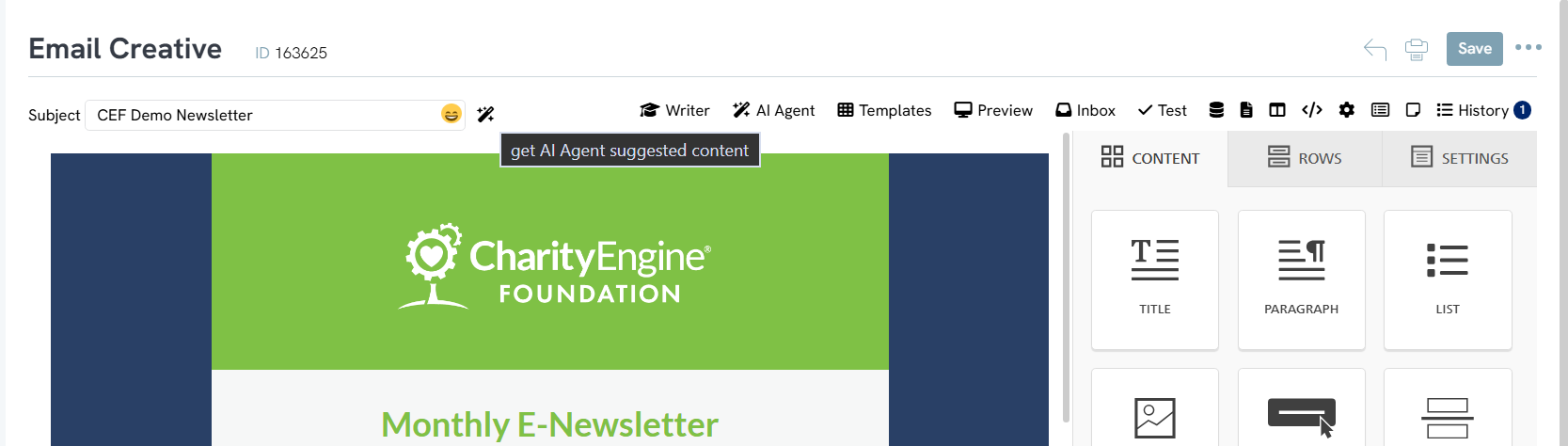
Instruction: Generate AI Suggestions
Step 1:
Select the type of content to generate or enhance.
Step 2:
Choose from supported content suggestions including:
- Subject lines
- Campaign messaging
- Landing page copy
- Donor communication language
Step 3:
Initiate the AI suggestion process.
Step 4:
Allow CharityEngine to analyze organizational engagement data and performance metrics to generate recommendations.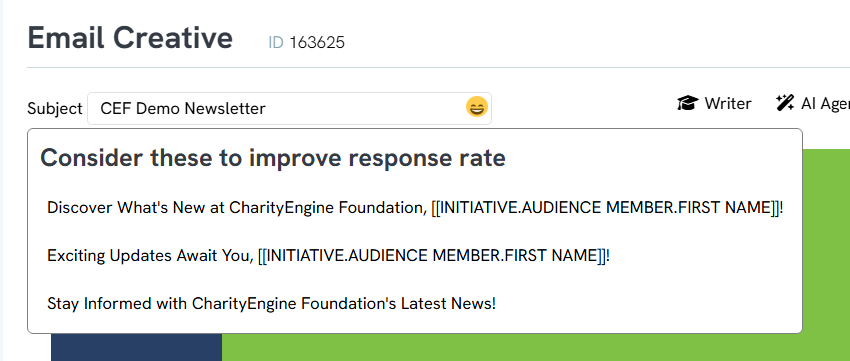
Instruction: Review and Edit Suggested Content
Step 1:
Review generated content suggestions.
Step 2:
Modify or refine suggested messaging to align with organizational tone, branding, and campaign goals.
Step 3:
Test multiple variations where applicable to optimize donor engagement.
Step 4:
Save approved content updates.
Instruction: Apply AI Content to Campaigns and Forms
Step 1:
Apply selected AI-generated content to the applicable campaign or form.
Step 2:
Publish or schedule the updated content as needed.
Step 3:
Monitor engagement and conversion metrics to evaluate performance improvements.
Outcome
After completing the above steps, the organization should be able to generate AI-assisted campaign and donor communication content directly within CharityEngine. This enhancement helps improve efficiency, streamline content creation workflows, and support stronger donor engagement through data-informed messaging recommendations.
FAQ & Further Reading
Q. What types of content can the AI Agent generate?
A. The AI Agent can suggest subject lines, campaign messaging, landing page copy, donor communication language, and additional campaign-related content.
Q. What data powers the AI recommendations?
A. Suggestions are informed by the organization’s historical engagement data and performance metrics within CharityEngine.
Q. Is this feature available to all organizations?
A. No. This feature is currently available to organizations provisioned for Writer Assistant powered by ChatGPT.
Q. Can generated content be edited before publishing?
A. Yes. Organizations can fully review and edit all suggested content before use.
Articles
- Web Forms: Using the WYSIWYG Editor for Forms and Emails
- Shopping Cart: How to Configure the Checkout Subtab
- Shopping Cart: How To Create a Shopping Cart to Sell a T-shirt
- Shopping Cart: Custom Fields and Variants for Products
- Shopping Cart: Configuring Product Inventory
- Shopping Cart: How To Create Products
- Why and How to Use "Donor Covers Processing Fee" as a Fundraising Tool for Online Donation Forms
- Web Forms: Character Limit on Text Fields
- Web Forms: How to Manage Out-of-the-Box Donation Block
- Events: How to add Custom questions/Survey Questions to Event Forms
- Web2CRM User Guide
- Web Forms: Creating and Mapping Custom Field on a Form
- Web Forms: How to Add an Email Opt-In List
- Web Forms: How To Configure the Form Field Display
- Online: Constituent Portal Front End
- Online
- Web Forms: How to Add an E-Card to a Form
- Landing Page URL
- Pledge: How to Create and Manage Pledges - A Comprehensive Guide
- Web Forms: How To Customize Out of the Box Sections and Fields
- Campaign - Surveys: How to Create a Poll & Survey Form and How to View the Results
- Web Forms: How to Create a List Sign Up Form (Contact Type Web Forms)
- Web Forms: Defining CharityEngine Web Form Types
- Creating an Event with Free Tickets
- Peer to Peer: Comprehensive Guide for Set Up, Configuration, and Reporting
- Embedding Quick Action Donation Forms with HTML
- Embedding Quick Action Donation Forms with Javascript
- Web Forms: How to Assign Tags through Form Submission
- Web Forms: How to Hide Tickets on an Event Form
- How to Bypass Payment Information on a Free Event
- Developer: API - Public API Troubleshooting
- Events: How to Create a Survey for Your Event
- Allowing Organizations to Donate on Web Forms
- Data Import: How to Import Soft Credits
- Browser Security Changes & Iframeing CharityEngine Donation Forms & Online Fundraising Apps
- Transaction App: Comprehensive Guide for Usage and Management of Tributes
- Online - Web Forms: Wallet Payment Options (Apple Pay and Google Pay)
- Web Forms: Guide on Replicating Forms
- Web Forms: How to Create an SMS Opt-In Form for SMS Campaigns
- Creating a New CMS Website
- Web Forms: Preventing Fraudulent Activities with Security Settings & Features
- In-Kind Gifts: How to Create and Manage In-Kind Gifts - A Comprehensive Guide
- Web Forms: Advanced Web Form Design Elements
- Web Forms: Creating a Donation Form (or other Web Form) - What’s Standard/Out of the Box?
- Transactions: Preparing & Sending Year End Statements
- Online: Online Constituent Portal Configuration
- Sustainers: How to Create and Manage Recurring Donors
- Online: Widgets - Embedding Donation, Sign-Up, and Legislature Look-up Forms
- Online: User Center Front End
- Events: Creating a Standard Out of the Box Web Form
- Developer: API - Installing the CharityEngine Public Web API
- Web Forms: Using Email Auto Responders with Forms
- Web Forms: How to Manage Fields
- People App: How to Create, Use and Manage Cases
- How to Configuring URL Redirects
- Web Froms: How to Create an Internal Form (for a Telethon, Radiothon, or Conference)
- How to Add Multiple Funds to a Web Form
- Peer-to-Peer Fundraising Set-up & Configuration
- Promo Codes & Discounts
- Web Forms: How to Test Web Forms
- Advanced Web Forms: How to use CharityEngine Tokens to Customize Your Form templates
- Web Forms: CAPTCHA Protection on CharityEngine Forms
- Web Forms: How to Design Your Web Form
- Online: How to Enable DAF Pay as a Payment Method
- How To: Set and Customize Language Preferences for Online Applications
- Forms 2.0 Transition Guide
- Customize Gift String via URL Parameters
- Forms 2.0 Transition - Template Style Guide
- Add Check Payment to Web Forms
- Web Forms Advanced - Add Goal Bar
- Selling Products/Funds on Web Forms
- Launching The Constituent Portal to Donors
- Adding "Double the Donation" to a Form
- Reordering Form Fields
