Introduction
CharityEngine uses a Shared Sending Domain by default for most organizations. This approach helps improve email deliverability by sending email through CharityEngine's managed email infrastructure, which maintains a strong sender reputation and proper email authentication.
For organizations with more advanced email requirements, CharityEngine also offers managed Custom Sending Domains as an optional service.
Table of Contents
- Introduction
- What is a Shared Sending Domain?
- Who Should Use a Shared Sending Domain?
- Why Use a Shared Sending Domain?
- How the Shared Sending Domain Works
- Will Recipients See a CharityEngine Email Address?
- Can I Customize the Sender Email Address?
- Can I Use My Own Sending Domain?
- Shared vs. Custom Sending Domain
- Frequently Asked Questions
What is a Shared Sending Domain?
A Shared Sending Domain allows multiple CharityEngine organizations to send email through CharityEngine's managed email infrastructure.
Rather than each organization maintaining its own sender reputation, CharityEngine manages the sending domain and its reputation on behalf of participating organizations.
This helps improve deliverability while reducing the administrative work required to manage email authentication and domain reputation.
Who Should Use a Shared Sending Domain?
A Shared Sending Domain is generally recommended for organizations that:
-
Send email campaigns infrequently (such as monthly or occasional communications)
-
Send to relatively small audiences
-
Do not have dedicated staff responsible for email deliverability or sender reputation
-
Want CharityEngine to manage email authentication and domain reputation
Most organizations will benefit from using the Shared Sending Domain.
Why Use a Shared Sending Domain?
Mailbox providers such as Gmail, Microsoft, Yahoo, and others evaluate sender reputation when deciding whether an email should be delivered to the inbox, filtered to spam, or rejected.
Organizations with lower email volume often have difficulty establishing and maintaining a strong sender reputation on their own.
Using CharityEngine's Shared Sending Domain provides several benefits:
-
Improved email deliverability
-
Established sender reputation
-
CharityEngine-managed email authentication
-
Reduced administrative overhead
-
Ongoing management of sender reputation by CharityEngine
How the Shared Sending Domain Works
When using the Shared Sending Domain:
-
CharityEngine sends email through its managed sending infrastructure.
-
You can configure a Friendly From Name that recipients see in their inbox.
-
You can configure a Reply-To Email Address so responses are delivered directly to your organization.
-
CharityEngine manages the underlying sending domain and reputation.
This allows your organization to focus on creating communications while CharityEngine manages the technical aspects of email delivery.
Will Recipients See a CharityEngine Email Address?
Typically, recipients will primarily see the Friendly From Name you configure for your organization.
For example:
From:
Springfield Animal Rescue
When recipients reply to the email, their response is sent to the Reply-To Email Address configured by your organization.
You can configure these settings under:
Configuration > Campaign > Default Settings > General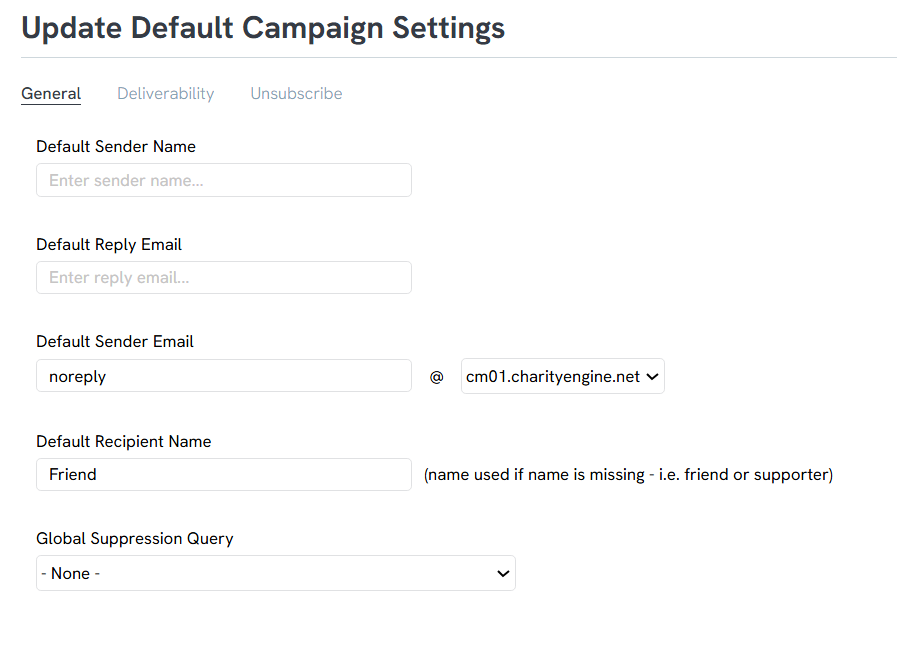
These settings may also be overridden on individual email communications where applicable.
Can I Customize the Sender Email Address?
Yes.
Organizations using the Shared Sending Domain may be able to customize the portion of the sender email address that appears before the @ symbol, depending on their service plan.
If you are interested in this option, contact your Account Manager for availability and pricing.
Can I Use My Own Sending Domain?
Yes.
Organizations that prefer to send email using their own branded sending domain may purchase a Custom Sending Domain service.
With a Custom Sending Domain:
-
Your organization sends email from its own domain.
-
CharityEngine manages the technical setup and ongoing monitoring.
-
Your organization maintains its own branded sender identity.
-
CharityEngine continues to assist with deliverability management and monitoring.
For more information, contact your Account Manager.
Shared vs. Custom Sending Domain
| Shared Sending Domain | Custom Sending Domain |
|---|---|
| Included with CharityEngine | Optional managed service |
| CharityEngine manages sender reputation | Organization sends using its own branded domain |
| Best for most organizations | Best for organizations with advanced branding or higher email volume |
| Minimal administration | Additional setup and managed monitoring |
Frequently Asked Questions
Will email replies still come to my organization?
Yes. Replies are sent to the Reply-To Email Address you configure.
Do I need to manage SPF, DKIM, or DMARC?
No. CharityEngine manages the sending infrastructure for organizations using the Shared Sending Domain.
Organizations using a Custom Sending Domain may have additional DNS configuration requirements during implementation.
Can I switch to a Custom Sending Domain later?
Yes. If your organization's needs change, you can work with your Account Manager to migrate to a managed Custom Sending Domain.
